
In full or in reduced form
After a restart, inspect in full like a first article or in reduced form, for example only the polarity-sensitive components.
The setup check safeguards the restart of the line: after a restart or reel change, the first PCB shows whether everything is right again.
After the first article and a restart, placement errors mainly occur when someone intervenes at the placement machine – for example during a reel change.
Incorrectly taped or mislabelled components only become apparent on the PCB – after a restart, too.
Searching component by component after every restart costs line time – inspecting only superficially for that reason lets errors slip through.
The image of the first PCB after the restart shows what has changed – you decide how deep the inspection goes.
After a restart, inspect in full like a first article or in reduced form, for example only the polarity-sensitive components.
Compared with the known-good board, deviations stand out immediately.
EFA handles the alignment of the image automatically.
Mark and describe errors, print the report or export it as a list – the placement remains traceable down to the feeder.
After a restart or reel change, EFA AOI inspects automatically as well:
Set up in a few minutes and can also be used before soldering – see inspection before soldering. More about EFA AOI with AI →
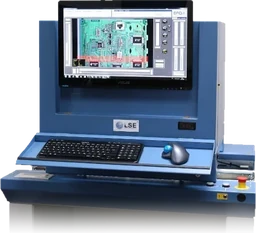
The microscopic full image of the entire PCB at up to 5,000 dpi – with the desktop unit at the workstation or the inline unit directly in the line. Every image goes directly to EFA SmartSuite.
More about EFA Picture →It safeguards the restart of the line: after a restart or reel change, the first PCB is inspected before production continues.
That is up to you: in full like a first article or in reduced form, for example only the polarity-sensitive components.
A known-good board: the image of a PCB that has been inspected and found to be correct. Compared with it, deviations stand out immediately.
No. The setup check works with or without coordinate data – EFA handles the alignment automatically.
With EFA, we achieve SMT line releases much faster.
This guided inspection gives us the certainty that the inspector has looked at and assessed every component. No element can be forgotten.
As we insist on an initial inspection before SMD soldering, we now also use the EFA inspection system specifically at that point, so that consequential errors can be ruled out in advance. In addition, this type of inspection reduces the downtime of our production lines.
All inspection methods at a glance: Production & inspection →
Do you have any questions? We will be happy to advise you – by phone, online or in person.